
What Is IJ7 Game?
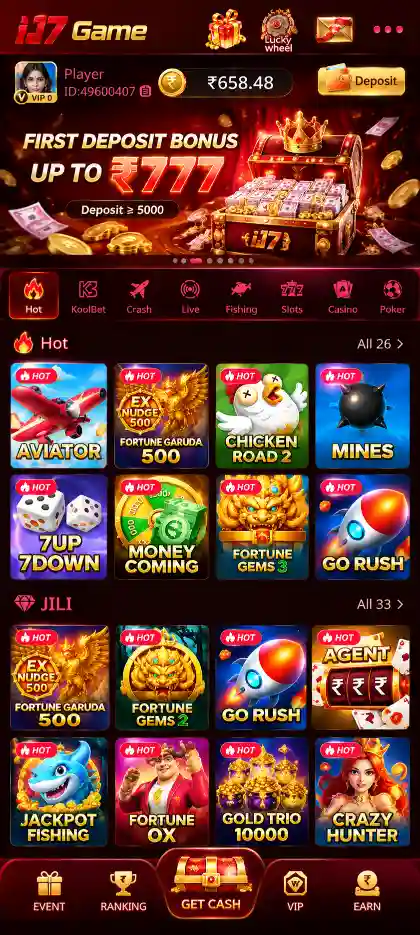
IJ7 Game, also known as IJ7, is an Android-based online gaming platform that brings together multiple game categories in one app. Players can explore popular games such as Aviator, Mines, Plinko, Dice, Slots, JILI, Rummy, Teen Patti, Fishing, and Casino games, each offering different gameplay mechanics, rules, and outcomes.
IJ7 Game includes crash-style games, card games, slot games, arcade-style fishing games, and casino titles. In Aviator, players follow a rising multiplier and decide when to cash out. Mines involves selecting tiles while avoiding hidden mines, while Plinko uses a falling ball to determine results. Rummy and Teen Patti follow card-based rules, and Slot games use reels, symbols, and paytables.
Along with its game collection, IJ7 Game provides Android app access, mobile-number registration, account login, bonuses, rewards, and wallet features. Users can explore available games and manage account-related activities through the IJ7 app. For installation details, see the IJ7 App guide and IJ7 APK guide.
IJ7 Game Information

- Game Name
- IJ7 Game
- File Name
- IJ7.apk
- App Size
- 21.87 MB
- Version
- 2.3.5
- Bonus
- ₹200–₹500
- Platform
- Android
Games Available in IJ7 Game
IJ7 includes Aviator, Mines, Plinko and Dice alongside Slots, JILI, Rummy, Teen Patti, Fishing and Casino games. These games differ in how rounds begin, how results are calculated and which actions a player can take. Aviator uses a rising multiplier, Mines uses concealed tiles, Plinko uses a falling ball, while Rummy and Teen Patti follow card-combination rules.
Aviator Game – Crash Multiplier and Cash Out
Aviator is a crash game in which the displayed multiplier begins at 1.00x and rises as the aircraft climbs. A round ends at an unpredictable crash point. A player who has placed a stake must cash out before the crash to receive a return based on the multiplier at the moment of cash-out.
For example, a ₹100 stake cashed out at 1.50x represents a ₹150 total return, including the initial stake; the net difference is ₹50. If the aircraft crashes before cash-out, that stake is lost. This example explains the calculation, not a predicted outcome.
- Multiplier: The number increases during the round until the crash.
- Cash Out: Ends participation in that round at the displayed multiplier.
- Crash: Ends the round immediately; an uncashed stake is lost.
- Previous rounds: Earlier multipliers do not reliably predict the next crash point.
Check the individual Aviator game's stake controls and any automatic cash-out option before relying on them; available settings can differ between versions or game providers.
Mines Game – Safe Tiles, Hidden Mines and Risk
Mines uses a grid containing hidden safe tiles and mines. A player selects tiles during a round. Opening a safe tile allows play to continue; revealing a mine immediately ends the round. The aim is to stop before hitting a mine if the selected game offers a cash-out option.
The mine count influences the probability of finding a safe tile. More hidden mines mean fewer safe choices remain, while each safe selection changes the remaining possibilities. A higher displayed multiplier is associated with taking additional risk rather than a guaranteed return.
- Grid: Contains both safe positions and hidden mines.
- Mine count: Determines the distribution of risky positions.
- Safe selections: May increase a potential cash-out value.
- Mine reveal: Ends the round and loses the stake.
Plinko Game – Ball Drop and Multiplier Slots
Plinko is a ball-drop game. A ball falls through rows of pegs and eventually reaches one of several result slots at the bottom. Each slot has a corresponding outcome or multiplier. The landing position determines the round result.
The number of peg rows and the distribution of result slots determine the possible landing outcomes. Where a version offers low-, medium- or high-risk settings, different multiplier layouts may apply. A ball landing in a higher-multiplier slot is a game outcome, not evidence that the next drop will follow the same route.
Dice Game – Results, Odds and Payouts
Dice games are based on randomised dice outcomes or numerical results. The player chooses an available prediction or outcome according to that game's rules, and the result is checked after the roll. Some variants compare totals, while others depend on a specified number or range.
Read the exact winning condition and displayed payout before a round. A prediction covering more possible outcomes may have a different payout from a narrowly defined prediction. Individual IJ7 Dice titles may use different formats.
IJ7 Slot Games and JILI Collections
Slot Games – Reels, Symbols and Paytables
Slot Games use spinning reels with symbols arranged into combinations. Results are evaluated according to the selected game's paytable, which defines what counts as a winning combination and how returns are calculated. The number of reels, paylines, ways to win and special symbols varies by title.
- Reels: Vertical columns that display symbols after a spin.
- Paytable: Identifies qualifying combinations and their returns.
- Wild symbols: May substitute for other symbols when the game's rules permit.
- Scatter or bonus symbols: May activate a feature if a title includes one.
- RTP: A long-term theoretical percentage, not a promise about any session or individual spin.
Slot outcomes are random; the appearance of a near-match does not establish that a winning spin is due. Review the chosen game's paylines and feature rules rather than assuming all Slots operate identically.
JILI Games and Other Provider Collections
JILI is a game-provider collection that can include multiple game formats, not one fixed set of rules. PG, Pragmatic Play and Evolution also appear as collection names in IJ7. A provider name identifies a group of titles; each title still has its own gameplay, paytable or round instructions.
JILI and other provider collections can contain reels, bonus rounds, card formats and specialty games. A winning combination in a slot title depends on that title’s paytable, while a card title uses its own hand or round rules. Provider branding does not make the rules identical.
IJ7 Rummy, Teen Patti and Other Card Games
Rummy – Sequences, Sets and Valid Declarations
Rummy is a card game built around organising cards into valid sequences and sets. A sequence usually contains consecutive cards of the same suit, while a set groups cards of the same rank in different suits. Depending on the variant, a joker may substitute for another card.
In common Indian Rummy formats, a valid declaration requires at least two sequences, including a pure sequence without a substituted joker. Exact card counts, scoring, joker usage and declaration requirements vary by format, so the rules of the selected IJ7 Rummy variant determine whether a hand qualifies.
- Pure sequence: Consecutive same-suit cards without a wildcard substitution.
- Impure sequence: A qualifying sequence that uses a joker under the chosen rules.
- Set: Cards sharing a rank but belonging to different suits.
- Declaration: Submitting a hand for validation under the variant's requirements.
Teen Patti – Card Rankings, Blind and Seen Play
Teen Patti is played using three-card hands. Standard hand categories commonly range from a trail (three of a kind) and pure sequence to sequence, colour, pair and high card. The exact ranking and comparison rules depend on the version being played.
In traditional formats, blind means acting without viewing one's cards, while seen means playing after checking them. A show compares hands when the selected rules allow it. Some digital variations simplify or change these actions, so the in-game instructions remain authoritative.
Andar Bahar and Other Card Formats
Andar Bahar involves a reference card and cards dealt alternately to two sides until a matching rank appears. The winning side depends on where the matching card is dealt. Available payout rules can depend on the chosen version. Other card titles may use different hand comparisons or betting structures.
IJ7 Fishing and Casino Games
Fishing Games – Targets, Controls and Scoring
Fishing Games use arcade-style action with moving targets. Depending on the title, the player may aim a cannon or similar control, select a power level and attempt to hit fish or other objects. The result depends on the game-specific target and scoring mechanics.
Different targets may carry different values, and ammunition or power settings may affect the cost of each action. Always check how the particular title calculates points or payouts; the graphics alone do not define the scoring system.
Roulette and Casino Games
Roulette uses a numbered wheel and a ball. The final numbered pocket determines the round result. Bets can relate to specific numbers, groups, colours or other outcomes where permitted by the game version. Roulette rules and odds depend on the wheel type and available betting options.
IJ7 also lists Casino and game-show formats, including Crazy Time in its recorded selection. Wheel games, card games and game-show titles follow different rules and payout structures; the chosen title's instructions explain the available outcomes.
KoolBet Game Collection
KoolBet groups several familiar formats, including Aviator, Mines, Rummy and Andar Bahar in the IJ7 selection. The rules of a game depend on the individual title and version, not merely on the collection name. For crash games, focus on multiplier and cash-out rules; for cards, focus on combinations, declarations or matching outcomes.













IJ7 Game Key Features
IJ7 Game brings several distinct types of games into one Android application. Aviator relies on a rising crash multiplier, Mines uses hidden tiles, Plinko follows a ball-drop result, Slots use symbol combinations, and Rummy and Teen Patti follow card rules. Each type has its own gameplay and controls.
- Game variety: IJ7 includes Aviator, Mines, Plinko, Dice, Slots, Rummy, Teen Patti, Fishing and Casino games.
- Different game mechanics: Crash multipliers, concealed tiles, falling-ball outcomes, reels, card combinations and arcade-style targets offer different ways to play.
- Android access: The IJ7 APK allows the application to be installed on a compatible Android device.
- Mobile verification: Account access uses a registered phone number and an SMS verification code.
- Login password: The account section includes a password-setting option after mobile verification.
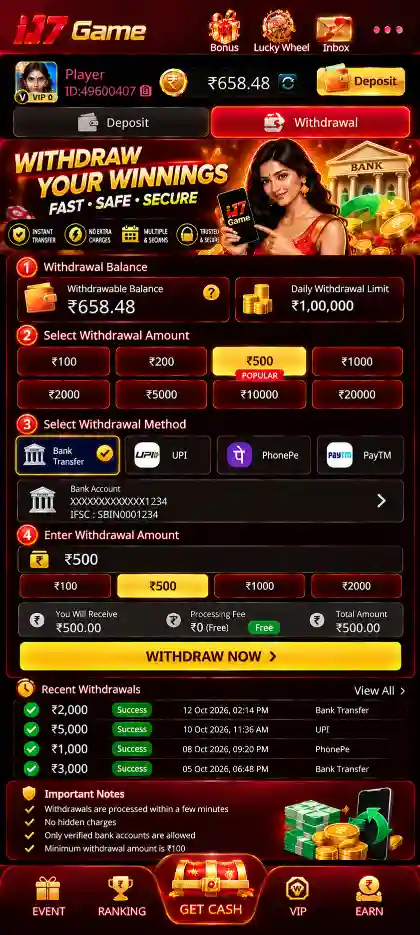
- Wallet tools: IJ7 provides balance records, deposit choices, bank-account details and withdrawal requests.
IJ7 also has bonus and rewards features. Current categories and offer details are covered on the IJ7 Bonus page.
IJ7 Game Bonuses and Rewards
IJ7 displays promotional sections such as First Deposit Bonus, 7 Days Daily Bonus, Ranking and Referral Rewards. The app information reviewed for this guide listed a ₹200–₹500 bonus range; the amount available to an account depends on the current offer and its conditions.
- First Deposit Bonus: Review eligibility and any wagering requirement before making a payment.
- Daily and Ranking Rewards: Check the applicable activity and qualifying criteria in the app.
- Referral Rewards: Read the invite and eligibility rules rather than assuming a fixed payout.
- Offer status: Promotions can change, expire or differ by account; view current terms before participating.
Read the IJ7 Bonus and Rewards guide for more information. A promotional credit is not a guaranteed winning outcome.
IJ7 Game Download for Android
Getting IJ7 onto your phone starts in the browser. Enter your correct mobile number on the download page, confirm it, and save the APK. The installation and first-time login happen afterward inside Android and the IJ7 app.
How to Download IJ7 Game
- Open the Download Page: Tap IJ7 Game Download; the download page opens in your browser.
- Enter Your Mobile Number: Type the correct, active number you will use for IJ7.
- Confirm the Number: Check the digits and tap Confirm.
- Allow the Download: Approve the browser download prompt when it appears.
- Save IJ7 APK: Wait for the APK file to finish downloading.
The downloaded file is normally in Downloads or File Manager. For more details, see the IJ7 Game Download guide, including the separate IJ7 APK installation steps.
How to Install IJ7 APK
- Open Downloads: Go to your phone's Downloads folder or File Manager.
- Find the APK: Locate the downloaded IJ7 APK file and tap it.
- Review Permissions: If Android asks to allow installation from this source, verify the source and approve it only if trusted.
- Install the App: Tap Install and wait for completion.
- Open IJ7: Tap Open to start the application.
Downloading and installing are separate actions. Once installation finishes, IJ7 will open to the mobile-number login and verification process.
What to Check After Installation
- App launch: Confirm that IJ7 opens after installation.
- Correct number: Keep the same active mobile number used on the download page.
- SMS access: Make sure the phone can receive the verification code.
If the APK does not open, first check whether the file downloaded fully and whether Android completed the installation. Do not use an unrelated modified APK to bypass device checks.
IJ7 Game Registration and Mobile Binding
For first-time access, IJ7 connects your account to a verified mobile number. Use the same number you entered on the download page so the process stays consistent.
First-Time Login and Verification
- Open IJ7: Launch the installed app.
- Enter the Number: Type your correct mobile number in the field shown.
- Send Code: Tap Send Code to receive a verification code by SMS.
- Enter the Code: Type the code sent to that number.
- Access Your Account: After successful verification, IJ7 logs you in and binds the mobile number to your account.
Once mobile binding is complete, you can open IJ7 games and set a login password from your profile. Keep the verification code private. For a complete first-time walkthrough, read the IJ7 Registration guide.
Why does the same number matter? The browser confirmation and in-app verification belong to the same account journey. Entering the correct number again avoids confusion about which mobile number is being linked.
IJ7 Game Login and Password Setup
First-time access uses mobile verification. After that, setting a login password makes returning to IJ7 easier: you can sign in with your registered number and password instead of requesting a code each time, unless extra verification is required.
How to Set Your IJ7 Login Password
Open My Profile → Account & Security → Login Password inside the IJ7 app.
- Open Login Password: Go to My Profile, open Account & Security and select Login Password.
- Enter Mobile Number: Fill in your registered mobile number.
- Verify by Code: Tap Send Code and enter the code received on your phone.
- Create Password: Enter a password containing 8–32 characters.
- Confirm and Save: Enter the same password in Confirm Password and save the changes.
How to Login Next Time
- Open IJ7: Launch the app and choose Login.
- Enter Your Details: Type your registered mobile number and saved login password.
- Sign In: Access your account and available games; complete additional verification only if the app requests it.
Keep your password private. For account-access help, see the IJ7 Login guide.
Login Details Worth Remembering
- First login: Mobile verification establishes access and binds the number.
- Returning login: Use the registered number and the password you saved.
- Password confirmation: Both password entries must match.
- Additional checks: Follow extra verification if the app requests it.
IJ7 Game Deposit, Withdrawal and Wallet Guide
The Wallet screen has two separate tabs: Deposit and Withdraw. Choose the correct tab before entering any payment details.
How to Deposit Money in IJ7 Game
- Open Wallet: Launch IJ7 and select Wallet → Deposit.
- Choose an Amount: Select one of the displayed deposit amounts.
- Select Payment Mode: Choose PayTM, PhonePe or QR Code where available.
- Review Payment: Check the payment amount and any first-deposit bonus or wagering condition shown.
- Tap Pay Now: Complete the payment using the instructions displayed.
- Check Your Balance: Return to the wallet or deposit screen and review the updated balance.
- Current deposit choices: Select an amount from the options shown in your account.
- Payment confirmation: Check the transaction status and wallet activity before making another payment.
- Payment tracking: Keep the transaction reference and use in-app support when a deposit is delayed.
- Offer conditions: Read any eligibility and wagering terms displayed before using a promotion.
Follow the displayed payment instructions and use the current QR code only for the intended transaction. The IJ7 Deposit guide covers payment options in more detail.
How to Add a Bank Account for IJ7 Withdrawal
When no bank account is linked, IJ7 displays Bank account required with an Add Card option.
- Open Withdraw: Go to Wallet → Withdraw.
- Add Bank Details: Tap + Bank or Add Card.
- Account Holder Name: Enter the bank account holder's legal name.
- Account Number: Enter your bank account number correctly.
- Enter IFSC: Add your bank's 11-character IFSC.
- Save: Tap Save & Continue to complete the bank account form.
How to Withdraw Money from IJ7 Game
- Open Wallet: Select Withdraw from the Wallet screen.
- Check Availability: Review Cash Balance and Withdrawable balance; these may differ.
- Select Bank: Choose your saved bank account.
- Choose Amount: Select a displayed withdrawal amount.
- Review Limits: Check the remaining withdrawal limit, VIP daily limit, wager requirement and applicable charges.
- Submit Withdrawal: Tap Withdraw and review the request status.
- Withdrawal limits: Check the current available amount and account-specific limit shown in the app.
- Account checks: The app shows withdrawable balance, remaining limits and wager requirements separately.
- Charges: Review any applicable bank or processing fees before confirming a request.
- Processing: Follow the in-app request status; arrival time may vary and is not guaranteed.
For more information about bank details and limits, read the IJ7 Withdrawal guide.
Why Cash Balance and Withdrawable Balance Can Differ
The withdrawal interface shows these as separate figures. A displayed cash balance is not necessarily the amount currently available for withdrawal.
- Cash Balance: The balance figure presented in the wallet.
- Withdrawable: The amount the withdrawal screen currently allows.
- Wager requirement: Any outstanding condition shown for that account.
- Fees and limits: Values to review before submitting a request.
Checking all four helps users understand the current screen before choosing an amount.
Balance Records and Live Support
- Balance Records: Review wallet and account activity available inside IJ7.
- Live Support: Use the support option if a deposit, bank detail or withdrawal request needs assistance.